ADCS Health Check · free
Finds expired CRLs and certificates in your Microsoft PKI before Wi-Fi, VPN or RDP go down.
A single PowerShell script checks your Active Directory Certificate Services in a minute or two and gives you a traffic-light report with concrete fixes. Read-only, nothing to install, no data leaves your network.
ADCS doesn't warn you. It just breaks.
Active Directory Certificate Services has no built-in expiry warning. When a CA's revocation list expires, clients suddenly reject every certificate that CA ever issued – usually months after anyone last touched the PKI, and right when nobody remembers where the offline root is.
- 802.1X Wi-Fi via NPS/RADIUS: nobody gets on the network
- VPN and Always On VPN: connections are refused
- LDAPS, RD Gateway and IIS: certificate errors everywhere
- Smart cards and Windows Hello for Business: sign-in fails
What it checks
The most common causes of Microsoft PKI outages in a single run.
Certification authorities
Enterprise CAs from Active Directory and whether the CA service responds to certutil -ping.
CA certificates
Expiry (warning below 365, critical below 90 days), RSA key length, SHA-1/MD5 signatures, expired leftovers in AD, chain validation including revocation status.
Revocation lists (CRL)
Base and delta CRLs from AD and via HTTP: expiry, overdue publishing, offline root CRL, stale copies, missing LDAP objects, orphaned CRLs after moving a CA.
CDP and AIA
Availability of every HTTP path in CA and issued certificates, plus a hint for the IIS issue with "+" in delta CRL names.
NTAuth
Is the current CA certificate in the NTAuth store? If not, smart card logon and certificate-based 802.1X will fail.
Issued certificates
Certificates in the CA database that expire soon and have not been renewed yet – renewals are detected.
Local store
Expiring certificates in the computer store of the machine running the check.
What the report looks like
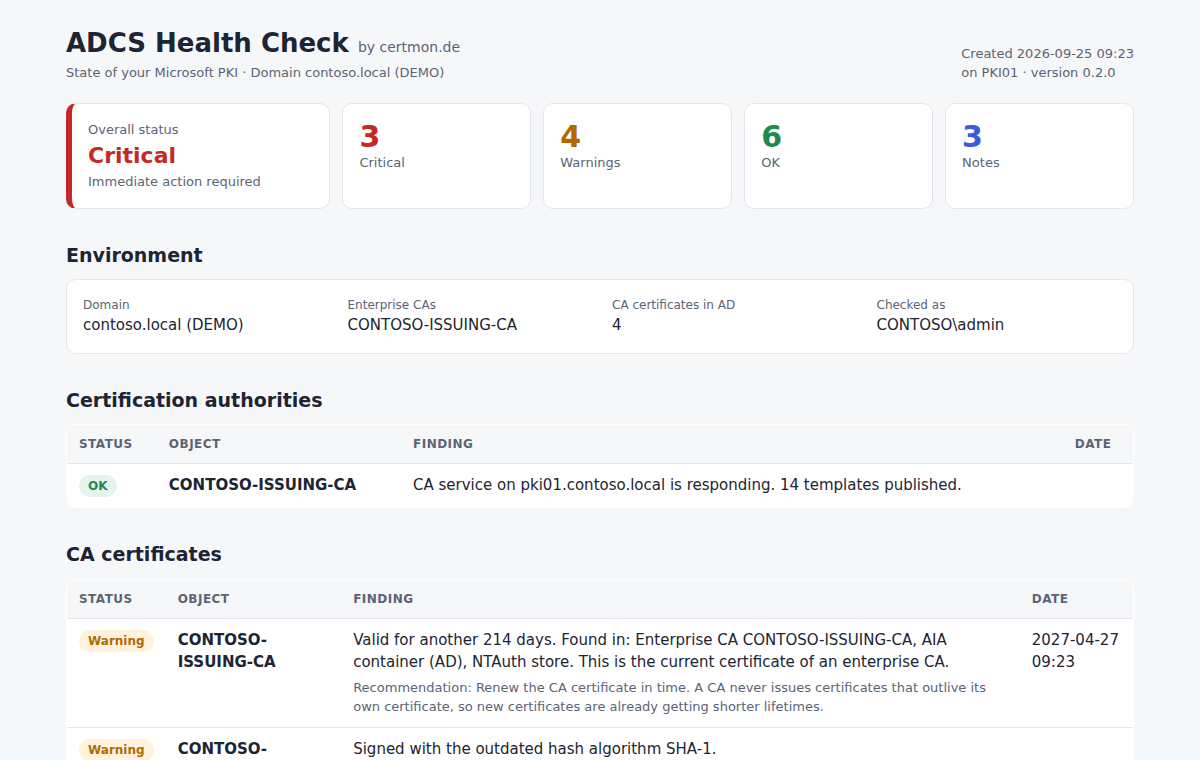
Overall traffic-light status, findings grouped by area and a concrete recommendation with the right command for every problem. The sample report shows a made-up environment (contoso.local).
Built for admins who don't run scripts blindly
- Read-onlyThe check changes nothing in AD, on the CA or on any server. It reads objects and fetches your CDP and AIA URLs.
- No data leaves your networkNo telemetry, no phoning home. The report stays on your machine.
- Nothing to installA single .ps1 file, no modules, no agent. Runs on Windows PowerShell 5.1 and PowerShell 7.
- Readable sourcePlain PowerShell, no obfuscation. Read what it does before you run it.
- ChecksumThe SHA256 hash is on the download page. Compare it with Get-FileHash.
- SignatureAn Authenticode signature is on its way.
Three steps to your report
Download
On a domain-joined server, ideally as CA administrator or right on the CA. Use your browser or PowerShell:
Invoke-WebRequest https://certmon.de/download/ADCS-HealthCheck.ps1 -OutFile ADCS-HealthCheck.ps1Verify and unblock
Windows marks files from the internet as blocked. Compare the checksum, then unblock the file:
Get-FileHash .\ADCS-HealthCheck.ps1 -Algorithm SHA256 Unblock-File .\ADCS-HealthCheck.ps1Run
After a minute or two the report opens in your browser. For RMM tools there are -Json and -NoOpen.
powershell -ExecutionPolicy Bypass -File .\ADCS-HealthCheck.ps1
FAQ
What permissions does the check need?
A regular domain account covers almost everything: any authenticated user can read CA certificates, CRLs, CDP/AIA and NTAuth from AD. Only the expiring issued certificates require read access to the CA database – CA administrators and domain admins have that. Without it, the report shows a note instead of an error.
What are the requirements?
Windows PowerShell 5.1 (built into Windows Server 2016 and later) or PowerShell 7 on Windows, on a member of a domain with an enterprise CA. No modules, no RSAT, no internet access – just access to your own CDP and AIA URLs.
Can I run it from my RMM or monitoring tool?
Yes. Exit code 0 means all OK, 1 warnings, 2 critical findings, 3 error. With -Json -NoOpen you also get a JSON file with stable finding ids that you can evaluate regardless of the report language.
What happens to my data?
Nothing – the check does not send any data, neither to us nor to anyone else. The report contains the names of your CAs, servers and certificates and only exists locally. Share it only if you want to.
English or German?
Report and console follow the Windows display language. Use -Language en or -Language de to choose explicitly.
Why is it free?
Because a single look already prevents a lot of outages. And because we hope you'll give the ADCS Monitor a try afterwards: it runs the same checks continuously, on all your servers, and alerts you in time.
ADCS Monitor: always on, not just once
The health check is a snapshot. The ADCS Monitor watches your PKI around the clock and speaks up before anything expires.
- Every check of the health check, continuously and automatically
- Certificates on all your servers: IIS, RDS, Exchange, LDAPS, NPS
- Alerts by email or Microsoft Teams, with the lead time you choose
- One-time license, no subscription
- Runs entirely inside your network, no cloud
Planned from €199, one-time
Final pricing will be announced at launch. As a German small business (Section 19 UStG) we do not charge VAT.